Home page, news, search, knowledge, departments, employee app: we assemble an intranet from more than 50 solutions that fits your company – and hand it over with source code, templates and a trained editorial team.
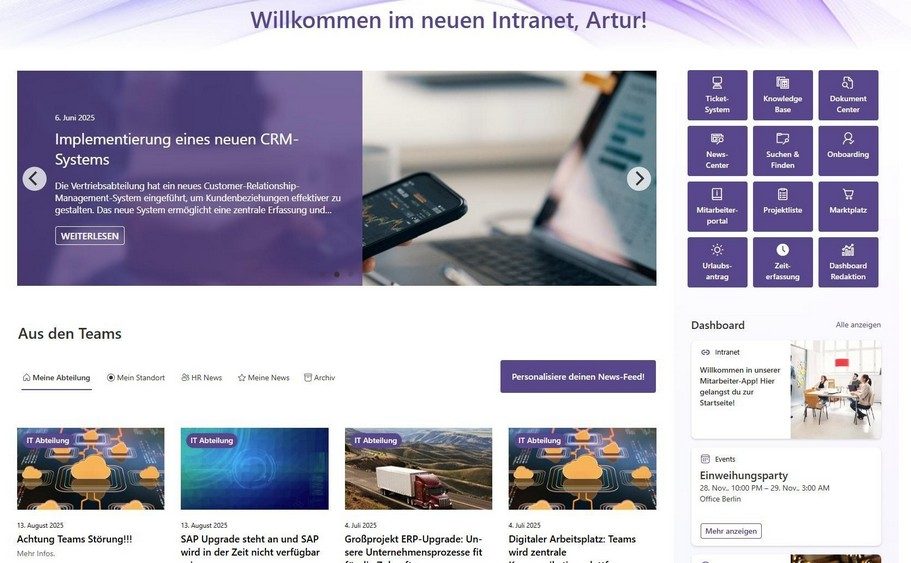
Every solution in the catalog can be added on its own – no new intranet project needed. Your existing pages and content stay in place.
Go to the solution catalog →Build from scratch or replace a third-party intranet: we design structure, governance and content and implement everything in Microsoft 365 – hand in hand with your team or turnkey.
How a complete intranet is structured ↓Four layers for your employees, two cross-cutting layers for reach and operations. Each layer is made up of solutions from the catalog – you decide what goes in.
The first click of the day: personal, uncluttered, relevant.
News reaches the right people – and the editorial team keeps the overview.
Content, documents and contacts are at hand within seconds.
Departments, locations and colleagues get a face.
The same content on the PC, in Teams, on the smartphone and on screens at your locations – with no duplicate maintenance.
So the intranet stays tidy, secure and up to date after go-live.
Examples of how customers put together their intranet. We tailor your package to your selection – with no recurring license fees.
The core: home page, news and search – replaces a third-party intranet or a newsletter system.
Stage 1 plus knowledge, documents and dedicated pages for departments and locations.
Stage 2 plus all channels and AI – also reaches production, logistics and international teams.
No subscription, no vendor lock-in: you receive the finished intranet in your Microsoft 365 tenant – and everything you need to run it yourself.
Full access to the source code of all web parts – one-time cost only, no per-user license fees.
Structure and governance – site architecture, permissions and templates for department and location pages.
Design that matches your brand – structure and visual design follow your corporate design and your target groups.
Trained editorial team – your team learns to maintain content for departments and locations on its own.
Testing, adoption and go-live – an extended user group tests, communication to everyone starts, then the intranet goes live.
Optional support and further development – regular check-ins on new requirements, if you want them.
We start with a first usable version and expand it based on your feedback.
Develop the concept and requirements together.
Implement structure, governance and requirements, technically and functionally.
Your team learns to maintain content for departments and locations on its own.
An extended user group tests, and communication to everyone starts.
The intranet goes live for the entire company.
Regular check-ins on support and new requirements.
We implement together with your team. Along the way, your team learns to run and develop the intranet on its own.
We deliver the finished solution with no internal effort on your side – including content, testing and go-live.
We have already migrated intranets and wikis based on Valo, Confluence, Powell, LiveTiles, Haiilo, Intrexx and TYPO3 to standard Microsoft 365. Almost any third-party system can be replaced – with a one-time cost instead of annual fees. Each system has its own replacement page with a feature comparison.
“Our new intranet quickly became our global information and communication platform. For internal communication, the SharePoint solution is a quantum leap.”
In a free consultation, we outline structure, scope and timeline with you – and you get a quote for exactly your selection.
